

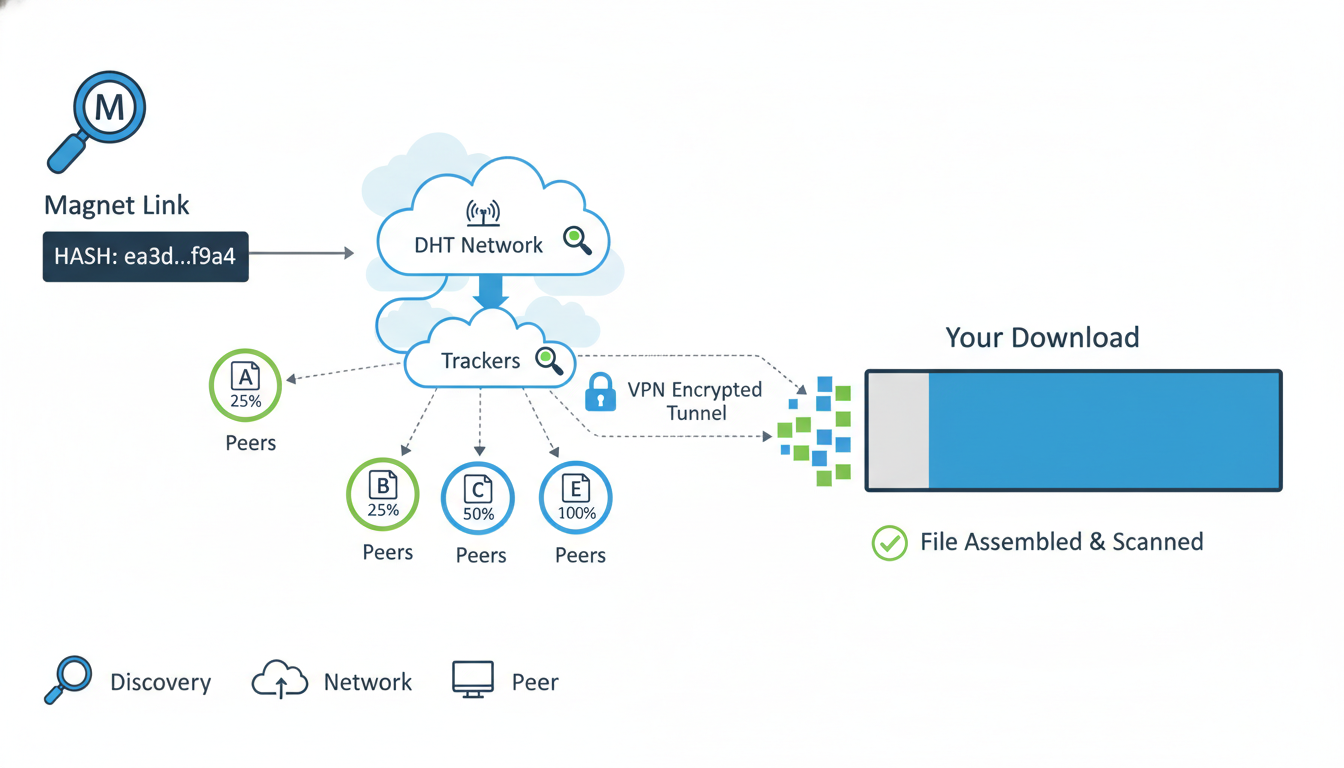
Magnet links: oh, they’re kind of this quietly powerful way to grab files, especially in P2P (peer-to-peer) circles. You’ve probably stumbled on them if you’ve ever used torrent clients—like how you know a familiar face at a coffee shop but can’t remember their name. This piece walks through Magnet Links: How to Use Them Safely and Protect Your Privacy, weaving in real context, small messy bits of conversation (like you’d murmur out loud when puzzling things out), and enough strategy to feel… well, informed. It’s not exact science—rather, a friendly guide balanced between practical know-how and genuine caution.
Why Magnet Links Matter—and Why Caution Matters Too
Magnet links are sort of like downstream shorthand that bypasses the need for downloading .torrent files. Instead of grabbing a whole file to start, your torrent client just retrieves needed metadata right in the moment. Setting aside the tech–a human story: imagine texting someone instead of picking up a lengthy phone message. Convenient, right? But just like texting someone weird, it can come with privacy pitfalls.
Beyond convenience, they’re decentralized and tough to block. That’s nifty for sharing open-source software, public domain media, obscure indie music—but equally attractive for questionable stuff. So knowing how to use them safely is super important. It’s not just because you’re tech-savvy; it’s because every geek, hobbyist, and curious lurker deserves control over their digital footprint.
Understanding Magnet Links in Plain Terms
Magnet links look something like this:
magnet:?xt=urn:btih:1234abcdef…&dn=filename.ext&tr=tracker-url
If that seems cryptic, break it down:
xt=urn:btih:...is the cryptographic fingerprint—basically, a unique ID for the torrent content.dn=is “display name,” so your client knows what to call it.tr=is a tracker server—helps peers find each other, though many modern clients rely on Distributed Hash Table (DHT) instead.
So, it’s all encoded. Unlike .torrent files loaded with metadata (sometimes including creator info or directory paths), magnet links are minimalist. That’s why a skilled privacy-minded person might gently prefer them. But of course, minimal doesn’t mean zero-risk.
Real-World Example
Say Alex wants to share a niche indie album they composed. They host it on a community tracker as a magnet link. Listeners get it directly; Alex never has to manage big files, track repositories, or worry about storage strain. Nice and tidy, right?
But then there’s another scenario: someone downloads the link from a questionable site. It could be dodgy software, malware-laced—so the flip side is legit concern.
Safety Basics: Tools and Tactics
You’ve got to think like someone who wants privacy and also like someone who wants to avoid nasty surprises.
Use a VPN (But… Choose Wisely)
A VPN masks your IP, effectively cloaking identity on the torrent swarm. That’s critical. But not all VPNs are created equal:
- Look for a no-logs policy. If they record metadata, they’re defeating your goal.
- Prefer ones with DNS leak prevention and built-in kill-switch. Because a dropped VPN connection is like accidentally unmasking yourself mid-download.
- Some VPNs advertise torrent support; that’s good. Still, double-check—they might throttle speeds or ban certain ports.
Tackle Malware Risks with Caution
Torrent content—even when delivered via magnet link—can carry hidden dangers. Here’s a simple safety checklist:
- Use a reputable torrent client—clients with sandboxing or verified versions.
- Open files only in secure environments—for instance, a VM or sandbox.
- Flag suspicious files—like executables from unknown sources.
Consider this: you might download a freeware tool from a random forum via magnet link. File looks legit at first glance. But opening it without scanning, on your main OS—well, that’s the digital equivalent of leaving your front door unlocked.
Leverage Peer Feedback and Verified Sources
Just like you’d check reviews before trusting a neighborhood contractor, check torrent communities’ feedback. Many sites tag “verified” or “trusted uploader.” Those tags aren’t foolproof—but they do reflect collective vetting.
Navigating Privacy Beyond VPNs
A VPN is necessary, not necessarily sufficient. Here’s where a layered game plan helps.
Prefer DHT and PEX Over Trackers
Trackers are like central directories—good for efficiency, maybe not for anonymity. DHT and peer exchange (PEX) decentralize discovery, reducing reliance on single points that might log IPs. Not a silver bullet, but combined with VPN, it’s a smart setup.
Seed Smart: Limit Your Exposure
Seeding means you’re sharing parts of the file after download. That’s a core of torrent ethics, right? But if you’re aiming for privacy, you might limit seeding:
- Set upload caps.
- Stop seeding immediately after download finishes.
- Or even use “leech-only” mode for particular files.
Remember, seeding is generous, but doing it without considering your digital footprint might circumvent the precautions of using a VPN or turning off logs.
Check Your Client’s Privacy Settings
Some torrent clients (qBittorrent, Transmission, etc.) let you enable or disable options related to IP binding, encryption, and peer exchange. Spend a minute in settings—turn on encryption, disable automatic port forwarding, etc. A little thing, but such small protective details count.
Case Study: Indie Filmmaker Distribution
Imagine a director—call her Maria—who finishes an indie short film. She wants to share it with film festival judges globally, and a magnet link seems attractive: lightweight, easy to share, and bypasses email attachments or cloud services throttled by size.
Maria:
- Generates a magnet link via a torrent client.
- Adds a fairly neutral title, but she’s concerned judges might trace distribution via IP logs.
- She uses a privacy-friendly VPN (no-logs provider), ensures DHT/PEX is enabled, trackers are disabled.
- She sets the client to stop seeding after ratio 0.1—enough for distribution, not eternal sharing.
Result? Judges access the file quickly, Maria’s privacy frame remains intact, she doesn’t have to juggle storage or deal with complicated upload workflows.
That tiny story shows how magnet links can be a productivity hack with built-in discretion, when handled smartly.
“Using magnet links with VPN and decentralized discovery gives you both convenience and a layer of anonymity, provided you lean into privacy features and avoid over-sharing,” notes a digital privacy consultant.
The Balance: Convenience vs. Risk
Using magnet links safely feels like walking a tightrope: lean too far toward comfort (skipping VPN, ignoring seeding rules) and you risk exposure. Lean too far on the paranoid side (overly tight sandboxing or refusing to seed at all) and you hinder the community spirit that keeps torrents alive.
Here’s balancing act bullet list:
- Always use VPN + encryption.
- Prefer decentralized peer discovery.
- Limit seeding while respecting sharing norms.
- Run downloaded content in secure environments.
- Favor verified, reputable sources.
That list is simple, maybe obvious—but habits evolve from repetition. Even seasoned users sometimes skip one of these steps, and that’s when the unexpected can happen.
Quick Walkthrough: Safe Magnet Link Workflow
- Install a trusted torrent client (e.g., qBittorrent, Transmission) with encryption support.
- Enable DHT and PEX; disable trackers if possible.
- Launch your VPN that promises no logs, DNS leak prevention, and kill-switch.
- Paste the magnet link. Set download destination in a sandbox/VM if it’s unfamiliar content.
- Download, scan files with antivirus or sandbox analyzer.
- Optionally seed briefly, but cap ratio and time.
- Shutdown torrent client and VPN after you’re done, to clear connections.
Following this simple flow helps reduce chances of leaking your IP, pulling malware, or oversharing.
Emerging Trends and Considerations
Something that’s starting to matter—some ISPs and even public networks now detect torrent-like traffic and throttle it. That’s where encryption matters not just for privacy, but for performance. A stealthy magnet download might still get flagged if BitTorrent protocol is visible. So choosing a VPN with obfuscation or using protocols that mimic HTTPS adds another layer.
Also, there’s a growing culture around web-based torrent engines that generate magnet links on the fly, paired with browser-based clients. That’s nifty for newcomers who don’t want to install software—but it’s also riskier. Your browser might be leaking referrer info, or you might unknowingly allow web-jacked code. For safety, stick with dedicated desktop clients when possible.
Conclusion
Magnet links offer a smart, lightweight way to share and download content—especially handy for open-source collabs, indie creators, or anyone managing large media. But safety isn’t automatic. It grows from thoughtful habits: using trusted clients, enabling encryption, running a VPN with strong privacy guarantees, and practicing cautious seeding.
By blending these steps—VPN, decentralized peers, safe seeding—you strike a balance between privacy-conscious usage and seamless convenience. And maybe that’s the sweet spot: easy, open sharing that doesn’t overexpose you.
FAQs
Q: Are magnet links safe to use by themselves?
Magnet links are safer than .torrent files because they don’t include metadata, but they’re not inherently private. Utilize a VPN, client encryption, and decentralized peer discovery to enhance security.
Q: Do I need a VPN to use magnet links safely?
Using a VPN with no-logs, DNS leak prevention, and a kill-switch is highly recommended. It masks your IP address and protects your identity on the P2P network.
Q: Is seeding with a magnet link risky?
Seeding extends your visibility, as your IP is shared. Limit seeding by capping upload ratio or stopping after a short duration to minimize exposure while still contributing.
Q: Can I avoid malware concerns completely?
Not fully. Always download content only from trusted sources, scan downloaded files before opening them, and consider running them in a sandbox or VM—especially if the origin is unfamiliar.
Q: What’s better—trackers or DHT?
DHT (Distributed Hash Table) and PEX (Peer Exchange) are decentralized and more privacy-friendly alternatives to trackers. Where possible, prioritize those to avoid leaking information through central servers.
Q: Are browser-based torrent services safer?
They may appear easier, but they also pose greater risks—like browser vulnerabilities, referrer leaks, or injected scripts. Dedicated clients remain the safer route for privacy-conscious users.

















Leave a comment